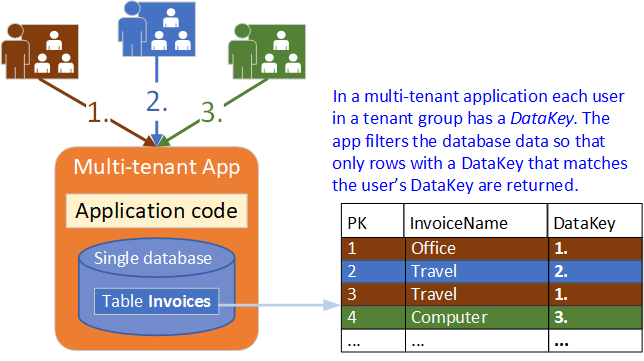
Many line of business applications are designed to work with multiple customers. It is important to secure the data so that customer data isn’t “leaked” or seen by other customers and potential competitors. These applications are classified as “multi-tenant” because each customer is considered a tenant of the application with their own set of data.
- Open a connection to the database,
- Create a DataSet to fetch or submit the data to the database, and
- Convert data from the DataSet to .NET objects or vice-versa to apply business rules.
EF Core is the successor to EF, but it is a complete rewrite and is not backwards compatible with previous versions of EF.
The figure shows the process that EF Core goes through the first time you use your application’s DbContext.
|

|
The following prerequisites are required for an EF Core project:
- .NET Core SDK (Software Development Kit), which is a comprehensive set of libraries and tools that developers use to create, build, and run .NET applications and libraries,
- Visual Studio, which is the Microsoft’s flagship software or Integrated Development Environment (IDE),
- SQL Server, which is a relational DBMS from Microsoft, and
- Entity Framework Core, which could be downloaded via the option “NuGet Package Manager” of Visual Studio.
|
“Why do they call it rush hour when nothing moves?” — Robin Williams |