An Online Bookstore for Store Owners only
According to a study, students in IT courses learn much more by building medium/large-scale exercises instead of many small-scale test programs like these, which give fragmented knowledge contrary to solid understanding of the system.Development Requirements
When start developing the exercise, follow the requirements below:
- Have to use Microsoft Visual Studio, ASP.NET, and SQL Server database.
- The exercise has to be Internet-enabled (a trend of current IT systems).
Soft Due Date† and Submission Methods
Due on or before Monday, October 19, 2026. Send an email to the instructor at wenchen@cs.und.edu including
- the SQL commands used, and
- an appointment to demonstrate your exercise to the instructor individually, so misunderstanding would be minimized. The instructor will prepare a set of test data to be used by all students. The instructor’s Zoom ID is https://und.zoom.us/j/2489867333 .
- COVID-19 Exams, Homeworks, & Programming Exercises ▶ Programming Exercise I
|
Objectives
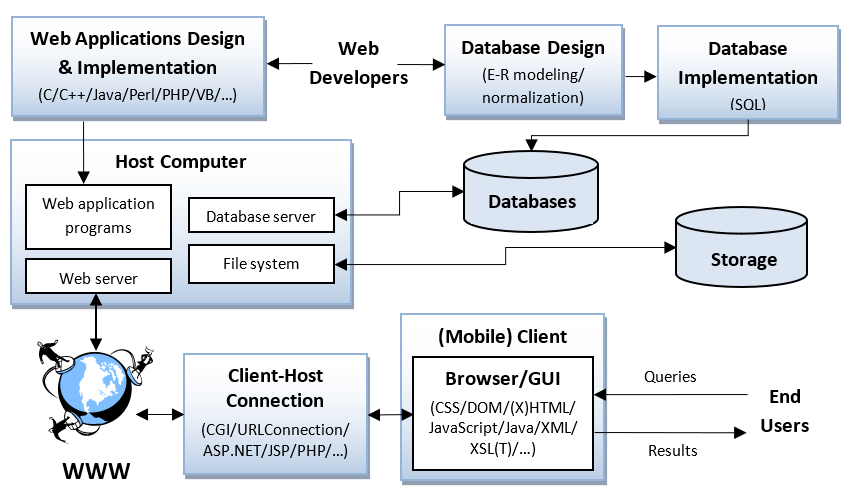
Database-driven web sites are a must for companies nowadays. This exercise has students design and implement a simple database-driven online bookstore for administrator only. ‡A generic database-driven website is shown on the right: Requirements The bookstore includes the following features: |
|
- The data of a book includes
- a unique ISBN (10 characters),
- a title,
- one or many authors, and
- a price.
- The data of an author includes
- a unique ID generated by the system,
- a name, and
- a category (including romance, fantasy, fiction, and horror).
- (System reset: 10%) The system can be reset, which is to clear all data stored in the database and files, so the instructor can test the system by using only his own test data. That is the system has to include a button such as on the system entry page.
- (Entering authors: 15%) After resetting the system, enter authors one by one, whose category is selected, but not typed.
- (Entering books: 15%) After entering all authors, enter books one by one of which authors are selected, but not typed.
- (Searching for books: 15%)
List a book if its title includes any of the case-insensitive keywords in a query, where the keywords are separated by spaces. If the query is empty, list all books. - (Updating a book price: 15%)
After searching, update the selected book price. - (Listing book data: 10%) After searching, list all data of a specific book (including an ISBN, a title, author names, and a price).
- (Listing author data: 10%) After listing book data, list all data of a specific author (including an ID, a name, and a category).
- (User-friendliness: 10%)
User-friendliness will be heavily considered when grading. In the past, some exercises were awkward, which made the grading or browsing difficult. For example, it is considered not user-friendly if the system repeatedly asks users to enter their names/IDs/passwords.
An Example of Web Page Display
Note that this example is not related to this exercise. It is only to show how to display web interfaces.
Evaluations
The following features will be considered when grading:
- Specifications:
- The instructor (or your assumed client) has given the exercise specifications as many details as he possibly can. If you are confused about the specifications, you should ask in advance. Study the specifications very carefully. No excuses for misunderstanding or missing parts of the specifications after grading.
- The specifications are not possible to cover every detail. You are free to implement the issues not mentioned in the specification, but the implementations should make sense. Implemented functions lacking of common sense may cause the instructor to grade your exercise incorrectly, and thus lower your grade.
- The exercise must meet the specifications. However, exercises with functions exceeding the specifications will not receive extra credits.
- Grading:
- This exercise will not be graded if the submission methods are not met. Students take full responsibility if the web site is not working.
- A set of test data will be used by all students. The grades are primarily based on the results of testing. Other factors such as performance, programming styles, algorithms, and data structures will be only considered minimally.
- Before submitting the exercise, test it comprehensively. Absolutely no extra points will be given after grading.
- The total weight of exercises is 40% of the final grade, 20% for this exercise (single user) and 20% for Exercise II (multiple users).
- Multiple browser tabs, browsers, or computers will be used to test the systems at the same time to make sure the multi-processing is working well.
- If not specified, no error checking is required; i.e., you may assume the input is always correct for that case. For example, the ISBN entered will always be a unique key of 10 characters (not digits).
- Feel free to design your own interfaces; user-friendliness will be heavily considered; each function/button will be tested extensively; and from the source code submitted, the programs will be examined.
- The newest Firefox browser will be used to grade exercises. Note that Internet Explorer, Edge, Chrome, and Firefox are not compatible. That is your exercises may work on the IE, Edge, or Chrome but not Firefox.
- The instructor will inform you the exercise evaluations by emails after grading.
- Databases:
- SQL Server database has to be used and try to perform the tasks by using SQL as much as possible because SQL, a non-procedural language, can save you a great deal of programming efforts.
- The SQL DDL commands such as have to be submitted, where SQL is Structured Query Language and DDL is Data Definition Language.
- From the source code submitted, the database design and programs will be examined. Poor database design or uses will result in a lower grade.
- (-05%) if the database design is NOT optimal.
- (-05%) if the SQL commands of database implementation is NOT submitted.
- There are many advantages of using databases. If database is not used, the problems caused by not-using-transaction must be considered. For example, if two customers are enrolled at the same time, an ID may be assigned to different customers if databases are not used.
- Comments:
- Make the exercise work first. Do not include extra features, such as user passwords, in the beginning. By the way, you will not receive credits for the extra features.
- Time management is critical for software development. If you are not able to complete the exercise, display whatever you have accomplished, so the instructor can give partial credit to your exercise.
- One way to build a complex web system from scratch is to design the user interfaces first and then implement the system button by button.
By doing this way, it could simplify the construction.
The recommended construction steps are
- Examining the specifications very carefully,
- Designing the databases (E-R modeling or normalization),
- Implementing the databases (SQL),
- Building the interfaces (HTML, CSS, and JavaScript),
- Implementing the system button by button, and
- Testing the exercise thoroughly.
- Web user interface is a trend for software systems compared to native user interface.
- Web, mobile, and database programming is a must for IT developers, and the only effective way to learn software development is practicing, instead of studying concepts or writing some testing programs.
No pain, no gain 😂
- Many times, simplicity is the same as user-friendliness.
|
When someone loves you, the way they talk about you is different. You feel safe and comfortable. ― Jess C. Scott, The Intern |