 using System;
 using System.Windows.Forms;

 namespace WindowsFormsApp1 {
   public partial class Form1 : Form {
     public Form1( ) { InitializeComponent( ); }

     private void Start_Click( object sender, EventArgs e ) {
       double next;
       double previous = DateTime.Now.TimeOfDay.TotalSeconds;
       double finish   = previous + int.Parse( sec.Text );
       int    i        = 1;
       Count  f        = new Count( );

       do {
         next = DateTime.Now.TimeOfDay.TotalSeconds;
         if ( next - previous >= 1 ) {
           f.Hide( );
           f.display.Text = i.ToString( );
           f.Show( );
           i = i + 1;
           previous = next;
         }
       } while ( finish > next );
     }
   }
 }
|
- The
DateTime.Now.TimeOfDay.TotalSecondsproperty returns adoublevalue representing the number of seconds elapsed since midnight. - To access another form from a form, create the other form by using the command
“ for example.Count f = new Count( );”,
display is a private property:
f.display.Text = i.ToString( ); |
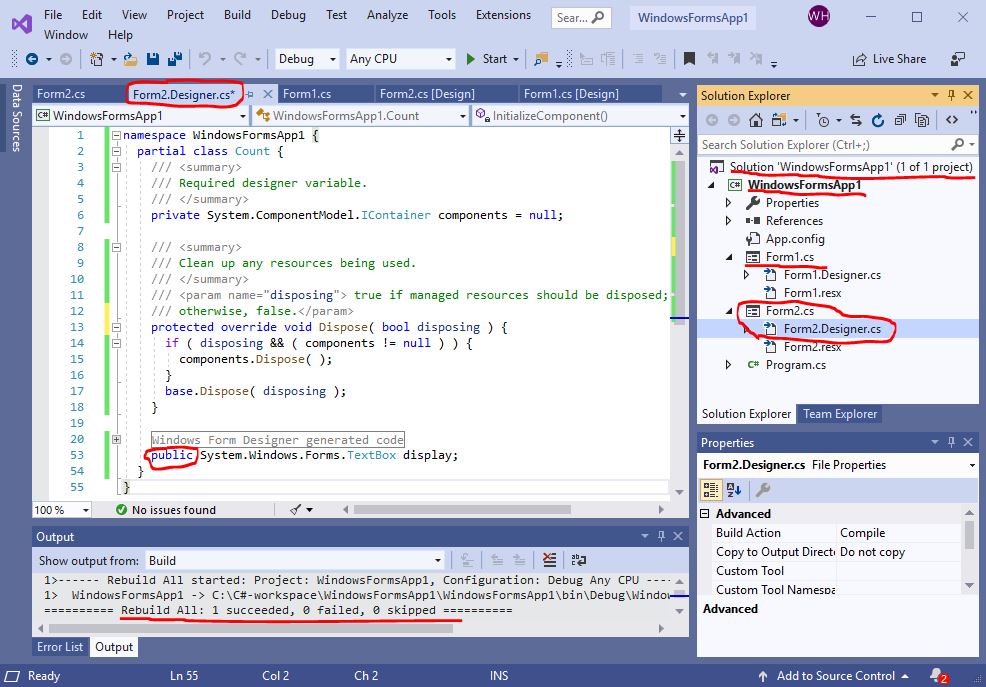
To fix the problem, change the modifier of
System.Windows.Forms.TextBox display from private to public in the Form2.Designer.cs, which is the C# code of the Form2 interface:
|
“Argued that winning a silver medal is the worst, as it means being the top loser.” ― Jerry Seinfeld |