| An Example (Cont.) |
|
|
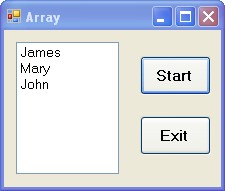
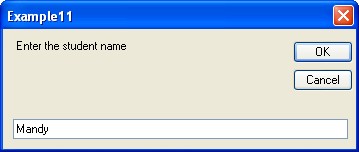
The following program is the implementation of the example:
 using System;
 using System.Windows.Forms;

 namespace WindowsFormsApp2 {
   public partial class Array : Form {
     public Array( ) { InitializeComponent( ); }

     private void addName( ) {
       string[ ] studentName = new string[5];
       for ( int i = 0; i < 5; i++ ) {
          studentName[i] = Microsoft.VisualBasic.Interaction.InputBox(
            "Enter the student name:" );
          nameList.Items.Add( studentName[i] );
       }
     }
     private void Start_Click( object sender, EventArgs e ) {
       nameList.Items.Clear( );
       addName( );
     }
     private void Exit_Click( object sender, EventArgs e ) {
       Application.Exit( );
     }
   }
 }
|
- The
ListBoxcontrol displays a list from which the user can select one or more items. - The
ListBox.Itemsproperty gets the items of the ListBox. - The
ListBox.Items.Addmethod adds an item to the list of items for a ListBox. - The
ListBox.Items.Clearmethod removes all items from the list.
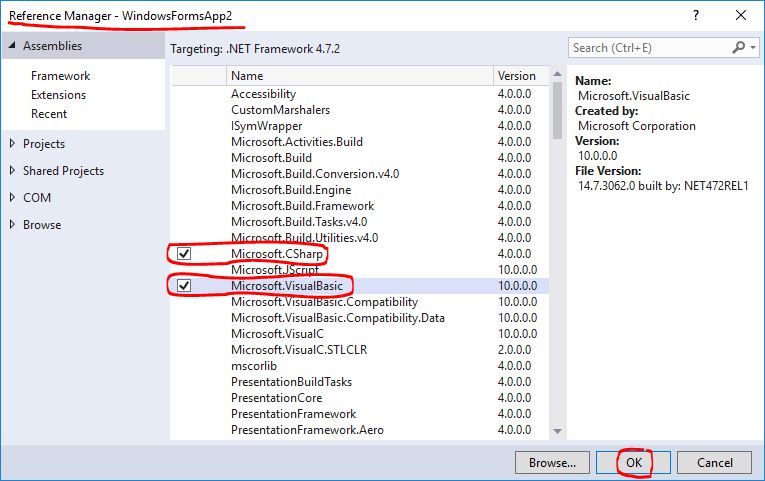
Microsoft.VisualBasic.Interaction.InputBox work for C#, add the Microsoft.VisualBasic by using the Reference Manager:
- Right click the project
WindowsFormsApp2in the Visual Studio, - Select the option
Add, and - Select the option
Reference....
|
“Argued that winning a silver medal is the worst, as it means being the top loser.” ― Jerry Seinfeld |